
Best iPhone Duo Apps: Turn Your Foldable iPhone into a Handpan Studio
The countdown is almost over. On Friday, October 23, 2026, the first iPhone Duo devices start landing in people's hands. Before you unfold yours for the first time, here is one app worth having ready: Panora, a virtual handpan that uses the whole open screen to become a tiny music studio.
iPhone Duo release date: October 23, 2026
A foldable iPhone has been one of the most talked-about devices in years, and the wait ends next Friday. October 23 is the day the first iPhone Duo owners get to fold, unfold and start exploring. And the first thing most of them will do is open the App Store and search for apps for iPhone Duo.
That search matters. A bigger screen is only exciting if the apps on it do something a phone could not. The best iPhone Duo apps will be the ones that treat the unfolded display as two connected workspaces, not just a stretched-out phone.
What makes a great iPhone Duo app?
When you are choosing which apps to install on day one, look for these qualities:
- Two things at once. A tool on one side, a canvas on the other. No more jumping between screens.
- Touch targets that use the space. Bigger screens mean bigger, more precise controls, which makes a huge difference for games, drawing and music.
- Something you can only do unfolded. The best foldable apps give you a reason to open the device.
Creative apps benefit the most, and music apps in particular. Which brings us to the handpan.
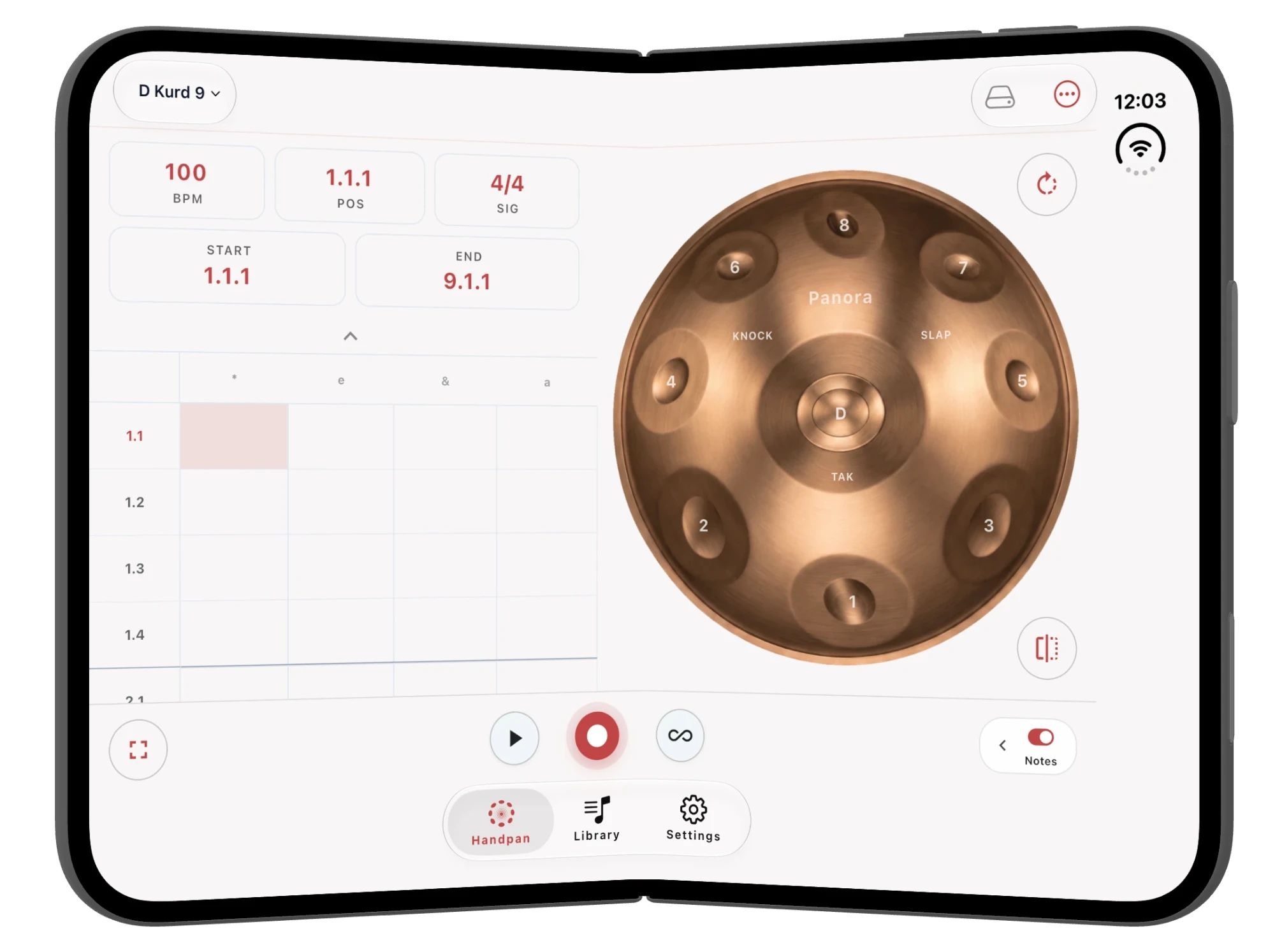
Panora on the iPhone Duo: a handpan and a sequencer, side by side
On a regular iPhone, Panora is a beautiful pocket handpan. On the iPhone Duo, it becomes something more. Unfold the device and the screen splits into two halves that work together.
The right side: a full, playable handpan
A large copper handpan fills the right half of the screen. The central ding sits in the middle, surrounded by eight tone fields, with knock, slap and tak zones for percussion. Every note is a real recording, and every tone field is big enough to play with your fingertips the way you would on a real instrument. Prefer a different sound? Switch between 50 scales, from D Kurd 9 to tunings you have never heard before, with a single tap.
The left side: your beat grid
While you play on the right, the left half shows a step sequencer. Set your tempo in BPM, choose a time signature such as 4/4, mark start and end points for your loop, and watch your notes land on a grid broken down into beats and subdivisions. Hit record, play a pattern on the handpan, then press loop and layer new ideas on top.
Why the fold changes everything
On a single phone screen you are always choosing between playing and arranging. On the iPhone Duo you do both in the same moment: one hand on the handpan, your eyes on the groove. It feels less like using an app and more like sitting at a small studio desk that happens to fit in your pocket.
Who will love Panora on the iPhone Duo?
- Beginners. A handpan is tuned to a single scale, so every note fits with every other note. You will sound good from the very first tap.
- Meditators and sound healers. Unfold, put on headphones and let slow handpan patterns loop while you breathe. Read more about why handpan music feels so meditative.
- Producers and songwriters. Sketch a handpan loop on the train, then build on it at home.
- Handpan players. Practise patterns and try out new scales without carrying a steel instrument around.
Your first five minutes with Panora on the iPhone Duo
- Download Panora before October 23 so it is ready to go.
- Unfold your iPhone Duo and open the app.
- Pick a scale. D Kurd 9 is a great place to start.
- Set a gentle tempo, around 80 to 100 BPM.
- Press record and tap a simple pattern around the ding.
- Press loop, then add a second layer on top.
That is it: your first handpan track, made on a device that did not exist in anyone's pocket a week earlier.
Get ready before October 23
New hardware launches are hectic. Save yourself the search on day one and download Panora now. It already works on your current iPhone, and the moment you unfold your iPhone Duo, the handpan studio will be waiting for you. Can't wait until Friday? You can play a handpan in your browser right now.
iPhone Duo FAQ
When does the iPhone Duo come out?
The first iPhone Duo devices start reaching customers on Friday, October 23, 2026.
What are the best apps to download first on the iPhone Duo?
Look for apps that show two things at once on the unfolded screen instead of simply stretching a phone layout. Creative apps for music, drawing and notes benefit the most. Panora puts a playable handpan next to a step sequencer.
Is there a music app made for the iPhone Duo?
Yes. Panora has a layout for the unfolded iPhone Duo: a handpan on one side, and a beat grid with tempo, time signature, loop points, record and loop controls on the other.
Do I need musical experience?
Not at all. Because every handpan is tuned to one scale, there are no wrong notes. You can make something beautiful within minutes.